Extract every row from dense pages
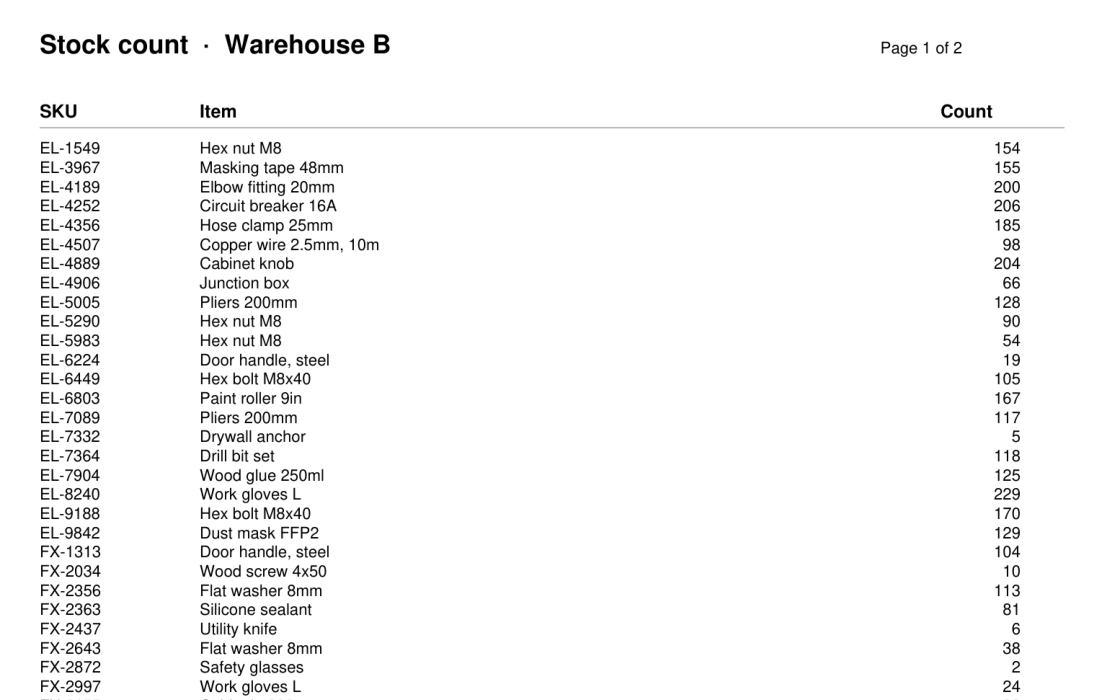
A stock count runs 70 rows to a page, and its two pages are scans with no text to copy. Send each page to TypeLLM as an image and read back every row as typed data: a SKU, an item and a count.
One read can stop before the page ends: an array returns at most 50 new items per call. So after each read, ask whether the page has a row after the last one, and read that row in the same call. If it does, carry on from there; if not, the page is done.
Set up
Install the library, and PyMuPDF to turn the PDF pages into images:
pip install "typellm>=0.6.9" pymupdfGet an API key from your dashboard:
import pymupdf
from typellm import TypeLLMClient

client = TypeLLMClient(api_key="YOUR_API_KEY", timeout=90)
doc = pymupdf.open("stock_count.pdf")
The scan is in the notebook's folder. Its pages hold no text layer: doc[0].get_text() returns ''.
Describe a row
ROWS is an array of rows. next_row asks about the row after a given one: has_next says whether there is one, and the row's properties are asked only when it is true.
CONTEXT = "One scanned page of a stock count."
ROW = {"sku": {"type": "string"}, "item": {"type": "string"}, "count": {"type": "integer"}}
ROWS = {"type": "array", "items": {"type": "object", "properties": ROW},
        "instructions": "Every row of the stock count on this page, in order."}

def next_row(last):
    questions = {"has_next": {"type": "boolean", "thinking": "auto", "instructions":
        f"The last row read so far is {last['sku']} {last['item']} {last['count']}. "
        "Is there another row below it on this page?"}}
    for name, field in ROW.items():
        questions[name] = {**field, "when": {"has_next": True}, "instructions": f"The next row's {name}."}
    return questions
Read a page, then ask what comes next
Each read passes the page's rows so far as continue_from, so it picks up where the last one stopped. After each read, next_row asks about the row after the last one. A page is done when there is none:
def read_page(image):
    rows = []
    while True:
        rows = client.generate(context=CONTEXT, images=[image],
                               questions={"rows": {**ROWS, "continue_from": rows}}).result["rows"]
        print(f"  read up to row {len(rows)}")
        answer = client.generate(context=CONTEXT, images=[image], questions=next_row(rows[-1])).result
        row = {name: answer.get(name) for name in ROW}
        if not answer["has_next"] or row in rows:
            print("  no row after it")
            return rows
        rows.append(row)
        print(f"  row {len(rows)} after it: {row['sku']}")

rows = []
for number, page in enumerate(doc, 1):
    print(f"page {number}")
    rows += read_page(page.get_pixmap(dpi=200).tobytes("png"))
page 1
read up to row 50
row 51 after it: FX-8967
read up to row 70
no row after it
page 2
read up to row 50
row 51 after it: TL-2286
read up to row 70
no row after itFinal result
print(f"{len(rows)} rows, {sum(row['count'] for row in rows):,} units")140 rows, 16,351 unitsIt matches the footer printed on the last page: 140 lines, 16,351 units. The notebook runs all of it with your key, and downloads the scan for you: open it in Colab.